Unveiling the Hologram Font: A Modern Tool for Dynamic Creators
If you have been searching for a typeface that breaks away from the monotony of flat, static text, Hologram might just be the missing piece in your design toolkit. It is an incredibly cool color font, but calling it merely "cool" undersells its utility. In the world of design assets, finding a typeface that carries its own visual weight without needing layers of effects is rare. Whether you are building a brand identity from scratch, designing custom merchandise, or curating a feed for social media graphics, this font offers a vibrant, contemporary solution.
Understanding the Visual Personality of Hologram
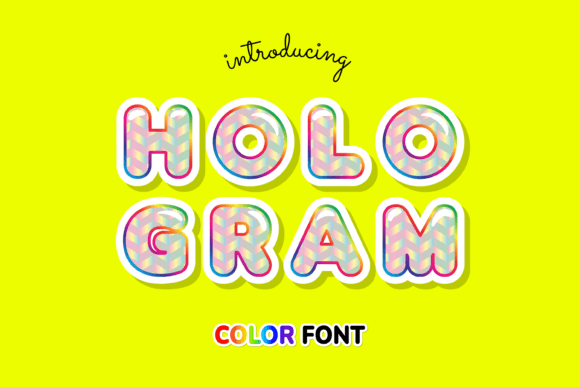
At its core, Hologram is a display font defined by its chromatic complexity. Unlike standard typography where you apply a flat color, Hologram utilizes OpenType-SVG technology to embed multi-colored gradients and textures directly into the font file. This means when you type a letter, it arrives on your canvas with a pre-rendered, high-fidelity finish. The visual style is undeniably modern, often evoking the aesthetic of iridescent surfaces, foil stamping, or digital glitch art. It commands attention, making it a perfect candidate for headlines, hero images, and logos where immediate impact is the goal.
The personality of this typeface is energetic and bold. It does not whisper; it speaks clearly and loudly. For entrepreneurs and small business owners looking to establish a brand identity that feels fresh and relevant, Hologram provides a shortcut to that "premium" look. It stands in stark contrast to traditional serif font families or standard sans serif font options, offering a tactile, almost 3D feel that flat design often lacks.
Strategic Applications for Designers and Marketers
Knowing what a font looks like is one thing; knowing where to use it effectively is another. Because Hologram is a premium font with heavy visual texture, it functions best in specific scenarios. It is a powerhouse for logo design for brands in the tech, fashion, or entertainment sectors. The holographic effect suggests innovation and futurism, which can subconsciously influence how a customer perceives a product's value.
For content creators and bloggers, this font is a game-changer for social media graphics. Instagram stories, YouTube thumbnails, and Pinterest pins often require text that is legible even at small sizes and against busy backgrounds. The built-in color gradients of Hologram ensure that the text pops without requiring complex layering in your design software.
Furthermore, consider its application in packaging design. If you are selling physical goods, using a color font like Hologram on labels or box art can mimic the look of expensive metallic inks or holographic foils during the mockup phase, or even in print if your printer supports spot colors. It bridges the gap between digital flair and physical print reality.
Technical Compatibility and Workflow
It is vital to address the technical side of this creative font. Hologram is an OpenType-SVG color font. This is a specific format that allows for high-resolution color data. Consequently, it is fully compatible with professional design software like Adobe PhotoShop, Adobe Illustrator, Silhouette Studio, and Inkscape.
However, there is a crucial distinction for crafters. This product is not compatible with Cricut Design Space. The OTF and TTF files included are optimized for software that can interpret SVG data for web design and graphic design applications. If you are a hobbyist using a Cricut machine for DIY crafts, you will need to use a standard vector font or a workaround, as Cricut generally flattens color data. Always check the Ultimate Font Guide provided for specific instructions on how to install and use these files to ensure your workflow remains smooth.
Pairing and Professional Implementation
One of the most common questions regarding modern typography is how to pair a complex display font with other styles. Because Hologram is visually heavy, it requires a balancing act. You generally want to avoid pairing it with a decorative script font or a busy handwritten font, as this will create visual chaos.
Instead, look for a clean, geometric sans serif font for your body copy. The simplicity of a typeface like Montserrat or Helvetica provides a resting place for the eyes after they absorb the vibrancy of the Hologram headings. This contrast is essential for readability. If you are working on editorial design, such as a magazine spread or a blog layout, use Hologram sparingly for pull quotes or section headers to maintain a professional hierarchy.
When evaluating the fit for your project, consider the "vibe" you are projecting. Hologram works exceptionally well for commercial font use in industries targeting younger demographics or the creative sector. It might not be the best choice for a law firm or a bank, but for a boutique marketing agency, a podcast cover, or a digital product launch, it is incredibly effective.
Maximizing Value with Design Assets
Treating Hologram as a key component of your design assets rather than just a one-off tool will yield the best results. Think about how you can use it to create a consistent look across different platforms. For example, you could use the font on your website headers to match the style of your printed business cards, provided you have the correct licensing for commercial use.
Before finalizing your design, always test the font at the specific size it will be displayed. While it is a premium font with high resolution, color fonts can sometimes lose clarity at very small sizes (like footnote text). Stick to headline sizes where the details of the color gradient can shine.
Ultimately, Hologram is more than just a trendy typeface; it is a versatile tool for visual storytelling. By understanding its strengths in logo design, social media graphics, and packaging design, and by respecting its technical requirements, you can leverage this font to create work that feels polished, energetic, and distinctly modern.