Mexico City: A Vibrant Color Font for Modern Creators
Understanding the Mexico City Typeface
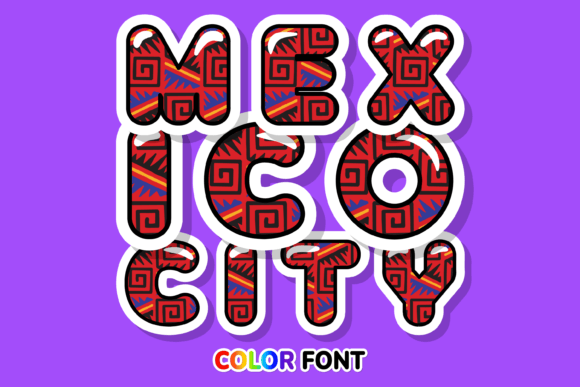
There is a distinct energy to Mexico City that you can almost feel through the screen—a blend of historical depth and contemporary flair. This premium font captures that exact essence. Unlike traditional typefaces that rely on a single monotone fill, the Mexico City font is an Opentype-SVG file. This means the color and texture are embedded directly into the font file itself. When you type, the letters appear with pre-rendered gradients, textures, and hues that mimic hand-painted strokes or artistic ink.
Visually, this is a bold display font designed to catch the eye immediately. It features irregular baselines and a textured, gritty finish that feels organic rather than digital. The personality of the typeface is confident and artistic, making it an excellent choice for projects that need to stand out from the sea of clean, geometric sans-serifs currently dominating the market. If you are looking for a creative font that bridges the gap between street art and professional design, this is a strong contender.
Strategic Applications for Designers and Brands
When considering where to deploy the Mexico City font, think about impact. Because it is a color font with high visual complexity, it functions best as a headline or accent element rather than a body text choice. Here are some practical scenarios where this typeface shines:
- Brand Identity and Logo Design: For brands in the lifestyle, music, food, or artisan sectors, this font offers an instant personality injection. It works beautifully for logos that need a human touch without sacrificing modernity.
- Packaging Design: If you are designing labels for hot sauces, craft beers, or boutique cosmetics, the texture of Mexico City mimics the look of screen printing or hand-lettering, adding perceived value to the product.
- Social Media Graphics: In a fast-scrolling environment, this creative font stops the thumb. Use it for Instagram story headers, sale announcements, or podcast covers to grab attention instantly.
- Editorial and Web Design: While it shouldn't replace your sans serif font for body copy, it makes for stunning pull quotes or section headers in lifestyle magazines and blogs.
The Psychology of Color Fonts and Brand Perception
Typography influences how an audience perceives a message before they even read the words. Using the Mexico City font signals that a brand is approachable, creative, and unafraid of bold choices. In modern typography, the trend is moving away from sterile perfection toward authenticity. This display font leans into that trend by offering a hand-crafted aesthetic.
However, it is vital to manage visual hierarchy. Because Mexico City is dense with color and texture, it naturally draws the eye. If you pair it with a busy background, the text will become illegible. Instead, use it against solid, muted backgrounds—think charcoal, cream, or deep navy—to let the color font take center stage. This creates a professional contrast that elevates the entire design.
Technical Compatibility and Workflow Integration
One of the most common questions regarding color fonts involves software support. It is important to note that the Mexico City font is an Opentype-SVG file. This technology allows for the rich color data, but it does require compatible software to render correctly.
This font is fully compatible with professional industry standards like Adobe Photoshop and Adobe Illustrator. It also works well with Silhouette Studio (Designer Edition or higher) and Inkscape. For designers working in these environments, the font installs like any other typeface but renders with its full colorful glory.
A Crucial Note on Cutting Machines: If you are a crafter or small business owner using a Cricut machine, you must understand that standard OTF or TTF versions of this font will not work for the print-then-cut feature in the same way a standard vector font does. While the machine can read the letter shapes, it cannot process the internal color data of an SVG font natively through the standard text input. To use this design with a Cricut, you would typically need to treat it as an uploaded SVG image rather than a typed font. Always check the Ultimate Font Guide provided by the seller for specific workarounds and detailed instructions.
Pairing and Practical Usage Tips
To get the most out of the Mexico City typeface, you need to balance its intensity. Here is a quick guide for font pairing:
- Pair with a Neutral Sans-Serif: The loud, artistic nature of Mexico City demands a quiet partner. A clean sans serif font like Montserrat or Open Sans works perfectly for subtitles and body text, ensuring readability while maintaining a modern look.
- Check the Readability: Because of the textured, painted style, very small sizes may become muddy. Test the font at the size you intend to use it. If the details blur together, increase the size or use it only for short words.
- Review Included Styles: Color fonts often come with alternative glyphs or standard vector versions. Check your glyphs panel in Illustrator or Photoshop; you might find swashes or alternate letters that add even more flair to your logo design.
Ultimately, Mexico City is more than just a font; it is a design asset that brings a specific vibe to your work. Whether you are creating merchandise, building a brand identity, or designing social media graphics