Spring Notes: Where Playful Color Meets Chunky Typography
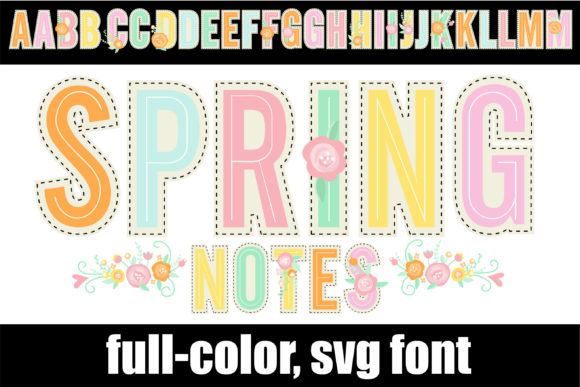
There’s a certain energy that only a bold, colorful typeface can bring to a design. You know the feeling—when a headline doesn’t just sit on the page but practically bounces off it, demanding attention and setting a mood instantly. That’s the world Spring Notes inhabits. This isn’t your average display font; it’s a full-color, chunky sans serif rendered in a palette of soft pastels, with delicate floral accents woven into its letterforms. Think of it as typography with a built-in springtime vibe.
At its core, Spring Notes is a heavy-weight sans serif, but calling it that undersells its character. The letters have a substantial, almost marshmallow-like presence, giving headlines and short phrases a tactile, approachable feel. The magic, however, is in the color. Each glyph is pre-colored in gentle pastels—think blush pinks, soft lavenders, mint greens, and buttery yellows. Scattered throughout are subtle floral motifs, perhaps a small bloom nestled into the curve of an ‘S’ or a leaf sprouting from the crossbar of a ‘t’. This combination creates a typeface that feels joyful, organic, and undeniably modern. It’s a creative font designed to make a statement without saying a word, perfect for projects that need to convey warmth, creativity, and a touch of whimsy.
Where Spring Notes Truly Shines: Real-World Applications
Understanding a font’s personality is one thing; knowing where to deploy it is where the real craft comes in. Spring Notes isn’t a workhorse for body copy—its strength is in the spotlight. As a premium display font, it’s engineered for impact in short, high-visibility bursts. Here’s where it can transform your work:
- Branding & Logo Design: For businesses targeting a youthful, feminine, or creative audience, a logo set in Spring Notes can become an instant brand identifier. Imagine a boutique bakery, a florist, a children’s clothing line, or a wellness blog using this as their primary wordmark. It builds a brand identity that feels friendly, approachable, and aesthetically cohesive from the first glance.
- Marketing & Social Media Graphics: In the crowded landscape of social feeds, you have milliseconds to stop the scroll. Use Spring Notes for Instagram quote graphics, Facebook ad headlines, or Pinterest pin titles. Its inherent color and texture eliminate the need for complex backgrounds, letting your message pop with minimal effort. It’s a fantastic tool for creating consistent, eye-catching social media graphics that build recognition.
- Packaging & Editorial Design: Product packaging for artisanal goods, cosmetics, or gourmet treats can leverage this font to signal quality and personality. On a magazine cover or a chapter title in a cookbook, it adds a layer of visual interest and modern typography flair. It pairs surprisingly well with clean sans serif fonts or even a classic serif font for contrast in editorial layouts.
- Digital Presence & Web Design: Use it strategically for hero section headlines, promotional banners, or event announcements on your website. It’s particularly effective for landing pages for webinars, workshops, or product launches where you want to create an immediate emotional connection. Just remember, as an OpenType-SVG font, its full-color glory is best viewed in applications that support this format.
- Personal Projects & Crafting: For digital scrapbooking, custom invitation suites, or printable wall art, Spring Notes offers a professional, polished look that’s hard to achieve with standard fonts. It’s a standout design asset for crafters who sell on platforms like Etsy or create personalized gifts.
Making It Work: Practical Guidance for Designers and Creators
Integrating a specialty font like this into your toolkit requires a thoughtful approach. It’s not just about liking how it looks in a preview; it’s about ensuring it serves the project’s goals. Here’s a practical checklist for using Spring Notes effectively.
Evaluate the Project Fit First
Before you even download, ask: Does this font’s personality align with my project’s tone? Spring Notes communicates joy, creativity, and softness. It would be a mismatch for a corporate law firm’s annual report but could be perfect for a sustainable skincare brand’s new product line. Always let the project’s message guide your typeface choice, not the other way around.
Master the Art of Font Pairing
A font this distinctive needs a partner that complements, not competes. The goal is visual hierarchy. Pair Spring Notes with a simple, neutral sans serif font for subheadings or body text. Think of fonts like Open Sans, Lato, or Montserrat. This allows the display font to command attention while ensuring the supporting text remains highly readable. For a different aesthetic, you could pair it with a clean, elegant serif font for a sophisticated contrast. Always test your font pairing in context to see how the weights and sizes interact.
Understand the Technical Nuances
This is a critical step. Spring Notes is a color font (OpenType-SVG). This means its color and detail are embedded in the font file itself. It’s compatible with professional design software like Adobe Photoshop, Illustrator, Silhouette Studio, and Inkscape. However, it is not compatible with Cricut Design Space, which does not support the OpenType-SVG format. If you’re a crafter using a Cricut machine, this is a vital consideration. For the best experience with any color font, consult a resource like the Ultimate Font Guide to understand compatibility and usage tips.
Consider Readability and Scale
Because of its chunky, colorful nature, Spring Notes is designed for large-scale use. It’s not meant for paragraphs or fine print. Use it for headlines, subheads, logos, and call-to-action buttons. Test it at the size you intend to use it—what looks charming on a 72-point headline can become muddy and illegible at 12 points. The pastel colors, while beautiful, may have lower contrast on certain backgrounds, so always check legibility against your chosen backdrop.
Leverage It for Brand Consistency
If you adopt Spring Notes as part of your brand’s visual system, use it consistently. Apply it to the same types of elements across all platforms—your website headers, your social media post templates, your email newsletter titles. This builds a strong visual identity and makes your content instantly recognizable. Just ensure you have the appropriate commercial license for any business use.
Ultimately, a font like Spring Notes is more than just a collection of letters; it’s a design catalyst. It injects a specific mood and energy into your work, helping you connect with an audience that resonates with its playful, artistic spirit. By using it intentionally and pairing it wisely, you can turn ordinary designs into memorable visual experiences that truly come alive.