Verdure: A Creative Font with Botanical Flair
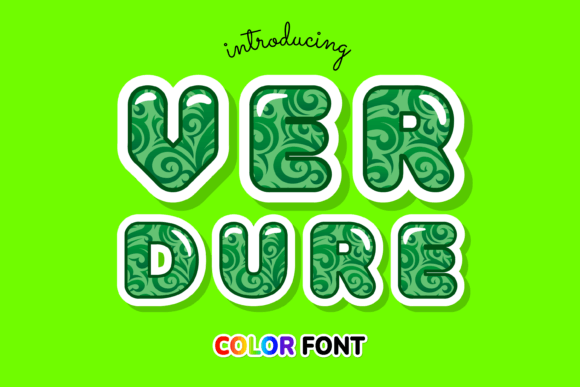
When you first encounter the Verdure font, it’s less like discovering a new typeface and more like finding a secret garden. This is a premium font that steps away from the stark minimalism of modern geometry and embraces the chaotic beauty of nature. Verdure is an incredibly cool color font decorated with botanical elements. It isn’t just text on a screen; it is a visual experience where letters are intertwined with leaves, vines, and flora. For designers looking to inject a sense of organic life into their work, this typeface offers a refreshing departure from standard digital lettering.
As a display font, Verdure’s personality is bold yet delicate. It captures a specific aesthetic that feels both vintage and contemporary. The visual characteristics are defined by the intricate botanical illustrations that form the letters themselves. Because it utilizes OpenType-SVG technology, the "color" aspect isn't just a layer style you have to apply; it is baked directly into the font file. This means you get high-resolution texture, shading, and multi-tonal greenery right out of the box. It acts as a bridge between typography and illustration, making it a powerful tool for anyone who wants their brand identity to feel lush and vibrant.
Where Verdure Fits Into Your Creative Workflow
Understanding where a creative font like this works best is key to using it effectively. Verdure shines brightest in projects where the title or headline needs to do the heavy lifting. It is a display font, meaning it is designed for impact rather than long-form reading. If you are working on editorial design, think of magazine covers, feature article headers, or chapter openers. It commands attention immediately, setting a mood that is sophisticated and nature-inspired.
For entrepreneurs and small business owners, the applications are vast. If you are in the wellness, beauty, gardening, or lifestyle sectors, Verdure can become a cornerstone of your visual language. Consider using it for packaging design for artisanal goods, organic teas, or skincare products. The botanical elements instantly communicate that a product is natural or handmade. Similarly, in logo design, a font like this can create a memorable mark for a boutique brand, a florist, or a high-end café. However, because of its detailed nature, it works best as a logomark or a wordmark for shorter brand names. A long business name might become visually cluttered if every letter is covered in vines.
Digital presence is another area where Verdure excels. In web design, you might use it for a hero image headline or a landing page banner to set an atmospheric tone. On social media graphics, it is incredibly useful for creating stop-scrolling visuals. Instagram posts, Pinterest pins, and YouTube thumbnails all rely on strong visuals to communicate a message in seconds. Verdure provides that "wow" factor without needing a complex background image. It stands on its own.
The Technical Reality: Compatibility and Usage
One of the most important practical considerations when working with a color font is compatibility. Verdure is an OpenType-SVG font, which is a specific format that allows for vector and raster data to be combined. This is what gives the letters their painted, textured look. However, this technology has specific requirements.
It is fully compatible with professional design software like Adobe Photoshop, Adobe Illustrator, Silhouette Studio, and Inkscape. This makes it ideal for professional graphic designers and serious hobbyists who use these platforms for their work. You can manipulate it just like any other text layer, changing the scale and position while retaining the high-quality botanical details.
Note! It is crucial to manage expectations regarding cutting machines and specific software limitations. This product is a color font (Opentype-SVG) and is compatible with PhotoShop, Illustrator, Silhouette, and Inkscape. The OTF and/or TTF files of this product are not compatible with Cricut. If you are a crafter using a Cricut machine, you will likely run into rendering issues because Cricut Design Space does not fully support the SVG data required to display the colors and textures correctly. Always verify your software capabilities before purchasing design assets to ensure a smooth workflow.
Strategic Application: Hierarchy and Pairing
Using a creative font like Verdure requires a bit of strategy regarding visual hierarchy. Because the font is so rich in detail, it naturally sits at the top of the hierarchy. It draws the eye. Therefore, you should rarely use it for body text. Trying to read a paragraph set in a botanical, textured display font would be exhausting for the viewer and would kill readability.
Instead, pair Verdure with something simple and clean. A neutral sans serif font is often the best companion. The clean lines of a sans serif will recede visually, allowing the botanical details of Verdure to pop without competing for attention. Alternatively, if you are going for a more traditional or academic look, a classic serif font can work well, provided it isn't too ornate. Avoid pairing it with a busy script font or a handwritten font, as this can make the design look chaotic and unprofessional.
When evaluating project fit, consider the emotional resonance. Does the project call for a sense of growth, nature, elegance, or vintage charm? If yes, Verdure is likely a match. If the project requires a sense of urgency, technology, or stark minimalism, you should probably look elsewhere. Modern typography trends often favor versatility, but Verdure is a specialty tool. It is designed to solve specific creative problems where atmosphere is just as important as information.
Professional Polish and Final Thoughts
For content creators and publishers, using a distinct typeface like this can significantly boost audience engagement. In a sea of generic Arial or Times New Roman documents, a well-designed PDF or digital brochure using Verdure signals that care and effort have been put into the presentation. It enhances brand perception, suggesting that the creator values aesthetics and quality.
Before finalizing your design, always test the font at the size it will be viewed. Since Verdure contains intricate botanical details, these elements might merge or look muddy at very small sizes. It is best suited for medium to large display sizes where the leaves and vines can be appreciated.
Ultimately, Verdure is more than just a typeface; it is a design asset that brings the outdoors in. Whether you are designing a wedding invitation, a book cover, or a social media campaign, it offers a unique blend of color and illustration that standard fonts simply cannot provide. By respecting its technical requirements and using it in the right context, you can leverage this font to create stunning, professional, and memorable designs.