The Display Signature: Authentic Hand-Lettered Style for Your Projects
A Font That Feels Handmade
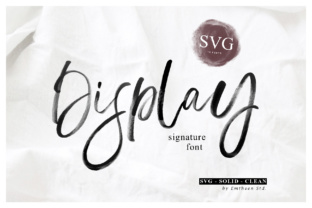
When you need a design element that carries genuine warmth and personality, a standard script font often falls short. The Display Signature typeface bridges that gap. It is an SVG font crafted to emulate authentic hand lettering. Unlike standard vector fonts, this premium font utilizes a specialized format that preserves the texture of a real brush. This means every curve and stroke retains the subtle imperfections found in actual handwriting, giving your work a distinct, human touch.
The creation process involved using a real brush, resulting in a display font that looks incredibly realistic. It captures the pressure and flow of a hand, making it an ideal choice for projects where you want to avoid a sterile, digital look. Whether you are designing a logo or creating social media content, this handwritten font offers an organic aesthetic that connects with viewers on a personal level.
Exploring the Three Distinct Styles
One of the strengths of Display Signature is its versatility through its three included styles. Understanding the differences helps you select the right tool for your specific needs.
- SVG Style: This is the core format. As an Opentype-SVG font, it renders with high-fidelity detail. You will see the paint-like texture and the varying opacity of the brush strokes. This style is perfect for high-resolution logo design and packaging design where realism is paramount.
- Solid Style: If you need the same letterforms but without the texture, the solid style provides a clean, filled-in version. This is useful for print applications where the texture might get lost at small sizes or when you need a cleaner silhouette.
- Clean Style: This variant removes the rough edges while maintaining the hand-lettered flow. It strikes a balance between the organic SVG version and a standard digital font.
It is important to note that while this is a creative font, it operates differently than standard TTF files. It is fully compatible with Photoshop, Illustrator, Silhouette, and Inkscape. However, due to the complexity of the color font technology, it is not compatible with Cricut machines.
Practical Applications for Designers and Entrepreneurs
Choosing the right typeface can significantly impact the effectiveness of your visual communication. Display Signature excels in scenarios where you need to establish an emotional connection with your audience.
Brand Identity and Logo Design
For businesses in the lifestyle, beauty, food, or artisan sectors, this font works exceptionally well for brand identity. It suggests that a human is behind the brand, which builds trust. Use it for your primary wordmark to establish a friendly and approachable tone. However, because of its detailed nature, it is best suited for larger display sizes rather than small sub-marks.
Editorial and Packaging Design
In editorial design, Display Signature can be used for pull quotes or magazine headers to break up the monotony of standard serif fonts or sans serif fonts. For packaging design, particularly on labels for coffee, skincare, or baked goods, the texture of the SVG style adds a tactile quality that suggests craftsmanship.
Digital Media and Web Design
While web design requires careful consideration of load times, this font shines in static graphics. Use it for hero images, blog post featured images, or promotional banners. It pairs beautifully with clean, geometric modern typography to create a strong visual hierarchy.
Maximizing Readability and Visual Hierarchy
As a display font, Display Signature is not intended for long paragraphs of body copy. Its strength lies in headlines, sub-headers, and callouts. When used correctly, it guides the reader’s eye to the most important information first.
Consider the visual hierarchy of your design. If your body text is a neutral sans serif font, using a bold, textured font like Display Signature for your H1 or H2 creates an immediate focal point. This contrast helps organize information and makes your content more digestible.
Font Pairing Strategies
Successful font pairing is about contrast and balance. Because Display Signature has a lot of character, it requires a stable partner.
- With Sans Serifs: Pair it with a clean, modern sans serif like Montserrat or Lato. The simplicity of the sans serif allows the details of the Display Signature to stand out without competing for attention.
- With Serifs: For a more sophisticated look, combine it with a transitional serif like Garamond. This works well for wedding invitations or high-end product catalogs.
- Avoiding Clutter: Do not pair this font with other decorative or script fonts. Mixing two complex typefaces usually results in a cluttered and confusing design.
Technical Considerations and Licensing
Before incorporating this asset into your workflow, verify the technical requirements. Since Display Signature is a color font, you need software that supports the SVG table in the OpenType specification.
Most modern versions of Adobe Creative Cloud products handle this natively. If you are using Silhouette Studio, ensure you have the Designer Edition or higher to utilize these features. For those using Inkscape, version 1.0 or later supports color fonts.
Commercial Usage
Most premium font licenses cover a wide range of commercial uses, including digital products, physical merchandise, and client work. However, always review the specific license agreement included with your download. If you plan to create a mobile app or a server-based web application where the font is embedded, check the license terms regarding embedding.
Final Thoughts on Creative Flexibility
Display Signature is more than just a collection of letters; it is a design asset that brings authenticity to digital projects. It solves the common problem of finding a handwritten font that doesn't look fake or overly stylized. By leveraging the SVG format, it offers a level of detail that standard fonts cannot match.
Whether you are a small business owner designing your own marketing materials or a designer looking for a unique typeface for a client, this font provides the tools to create memorable visuals. It balances the raw energy of hand lettering with the precision required for professional design assets. Explore the three styles to see which one best fits your creative vision and elevate your next project with a truly personal touch.